Skip to content
AGENTIC MARKETING PLATFORM

Create marketing content. Send and publish it.

Create copy and on-brand images. Review, send, and publish across email, social, blogs, and landing pages.

Get early access

From a request in your AI assistant to a campaign in Marqeable.

THE MARQEABLE WORKFLOWFrom the first prompt to the send button
A CONVERSATION. A CAMPAIGN.

Hey Marqeable,
write our product announcement email.

Ask. Create. Preview. Send.
ACTUAL APP. COMPLETE WORKFLOW.Explore the platform
WORKS WITH THE AI TOOLS YOU USE
Marqeable
EXAMPLE REQUEST

Write an email introducing our new product.

ONE CAMPAIGN. EVERY FORMAT.

Content for
every channel.

Start with one announcement. Create the email, text message, social posts, article, and landing page in Marqeable.

EXAMPLE REQUEST

Hey Marqeable,
Write an announcement email and a short SMS for our customers.

EmailSMS
01 / EMAIL & SMS

Reach customers by email and text.

Create a designed email and a concise text message for the same campaign. Review the content, choose the audience, and schedule delivery.

Scroll to explore
Continue to image creation

Email & SMS

01
EXAMPLE REQUEST

Hey Marqeable,
Write an announcement email and a short SMS for our customers.

EmailSMS
01 / EMAIL & SMS

Reach customers by email and text.

Create a designed email and a concise text message for the same campaign. Review the content, choose the audience, and schedule delivery.
Social

02
EXAMPLE REQUEST

Hey Marqeable,
Turn this announcement into LinkedIn and X posts.

LinkedInX
02 / SOCIAL

Adapt the message for each feed.

Create posts and on-brand images for LinkedIn and X. Review them alongside the campaign, then publish through connected accounts.

Explore social content

Blog

03
EXAMPLE REQUEST

Hey Marqeable,
Write a blog post explaining our new content agent.

ArticleImages
03 / BLOG

Give the announcement more detail.

Build a structured article with supporting images. Edit the draft and publish through a connected blog platform.

Explore blog content

Landing page

04
EXAMPLE REQUEST

Hey Marqeable,
Create a landing page for our new content agent.

PageLead form
04 / LANDING PAGE

Give the campaign a destination.

Bring the message, images, and lead form together on a landing page. Review the page and publish it from Marqeable.

Explore landing pages
IMAGE CREATION AND EDITING

Create on-brand images.
Edit them here.

Generate images using your brand colors, logo, and assets. Refine them with AI edits or use the built-in image editor before adding them to your content.

  • Use your brand assets and apply your logo.
  • Describe an image change and refine it with AI.
  • Crop and resize in the same workspace.
Explore images and content
CONTENT FROM THE PRODUCT TOUR
Marqeable-branded illustration used in the email shown in the product tour
The image used in the email demo. Copy and visuals live with the content.
MARKETING CALENDAR

Know what’s coming.
Plan the marketing around it.

Keep events, launches, offers, and important dates in one calendar. Ask Marqeable what’s coming up and where campaign planning still needs attention.

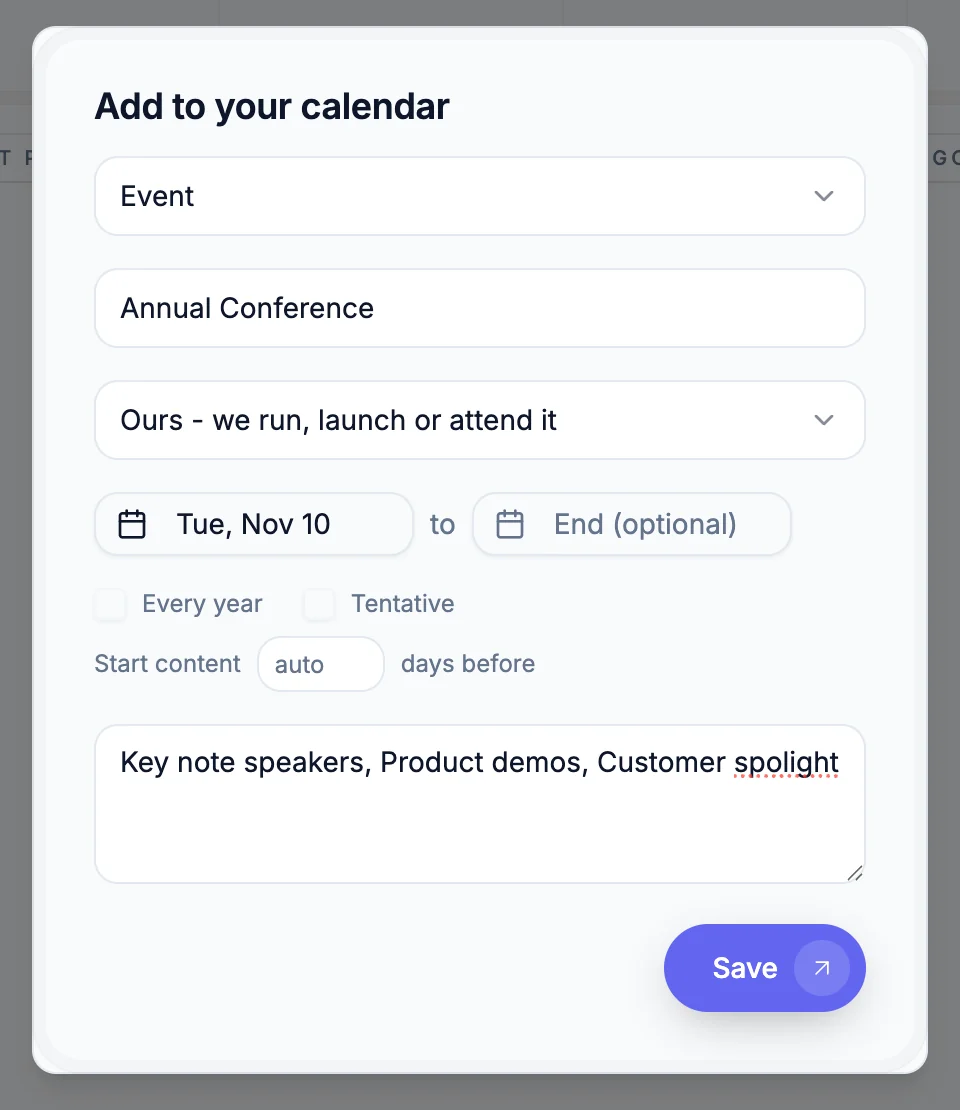
Start with an important date.

Add the Annual Conference, choose November 10, and include the details the marketing should cover.

Keynote speakers, product demos, and a customer spotlight.
MARQEABLE / CALENDAR01 / 04
Annual Conference · November 10 Keynote speakers, product demos, and a customer spotlight.
Annual Conference · November 10
Use the arrows to explore Explore campaign use cases
CAMPAIGN USE CASES

Scheduled campaigns.
Triggered follow-up.

Run a product launch, welcome new customers, or follow up after a webinar. Choose the audience, content, and timing for the job.

TRIGGERED CAMPAIGNS

Follow up when something happens.

Start a campaign when a form arrives, a trial begins, or a deal changes stage. Set the timing and conditions for each follow-up.

Explore triggered campaigns
EXAMPLE WORKFLOWTriggered
Audience New trial signups
  1. 1
    Trigger

    A trial starts

  2. 2
    Send

    Welcome email

  3. After 2 days

    Follow up if no demo is booked

Scroll through the use cases
Continue to the product tour

Open a use case to see the example workflow.

Triggered
TRIGGERED CAMPAIGNS

Follow up when something happens.

Start a campaign when a form arrives, a trial begins, or a deal changes stage. Set the timing and conditions for each follow-up.

Explore triggered campaigns
EXAMPLE WORKFLOWTriggered
Audience New trial signups
  1. 1
    Trigger

    A trial starts

  2. 2
    Send

    Welcome email

  3. After 2 days

    Follow up if no demo is booked

Lifecycle
LIFECYCLE CAMPAIGNS

Stay in touch beyond the first conversion.

Build onboarding, nurture, and re-engagement campaigns around where a contact is in the customer lifecycle.

Explore lifecycle automations
EXAMPLE WORKFLOWLifecycle
Audience Closed-lost opportunities
  1. 1
    Audience

    A deal is marked closed-lost

  2. 2
    Wait

    Allow time before reconnecting

  3. Send

    A relevant offer to take another look

Social media
SOCIAL MEDIA CAMPAIGNS

Plan social posts as part of the campaign.

Create LinkedIn and X posts alongside the email, blog, and landing page. Review the content and set the publishing schedule.

Explore multichannel campaigns
EXAMPLE WORKFLOWSocial media
Audience Product launch followers
  1. 1
    Create

    LinkedIn and X launch posts

  2. 2
    Review

    Check the copy and visuals

  3. Schedule

    Publish on the campaign calendar

Events
EVENT CAMPAIGNS

Promote the event. Plan the follow-up.

Prepare invitation emails, social posts, a landing page, and reminders around the event date. Keep the post-event campaign in the same plan.

Explore event campaigns
EXAMPLE WORKFLOWEvents
Audience Customers and prospects
  1. 1
    Before

    Invitations and social promotion

  2. 2
    Leading up

    Scheduled reminder messages

  3. After

    Thank-you and next-step email

Webinars
WEBINAR CAMPAIGNS

Follow up after the webinar.

Plan promotion and reminders before the session. Use attendance data to send attendees a recap and give no-shows the recording.

Explore webinar follow-up
EXAMPLE WORKFLOWWebinars
Audience Webinar registrants
  1. 1
    Before

    Invitation and reminder emails

  2. 2
    Audience split

    Attended or missed the session

  3. Follow up

    Recap or recording, with a next step

Triggers and audience conditions use the data connected to your workspace. Event and webinar examples cover promotion and follow-up.

TAKE A CLOSER LOOK

From your first prompt
to your next send.

Follow an email through the actual workspace. Pick a step to see it in action.

EDITING AND REVIEW

An agent’s review.
A team’s final say.

From the first draft to the last comment. Edit, review suggestions, and work through feedback in the same editor.

Agent review

A second look at every draft.

Review the copy for language, brand voice, compliance, and strategy. Suggestions appear beside the passages they refer to.

Captured in Marqeable’s editor
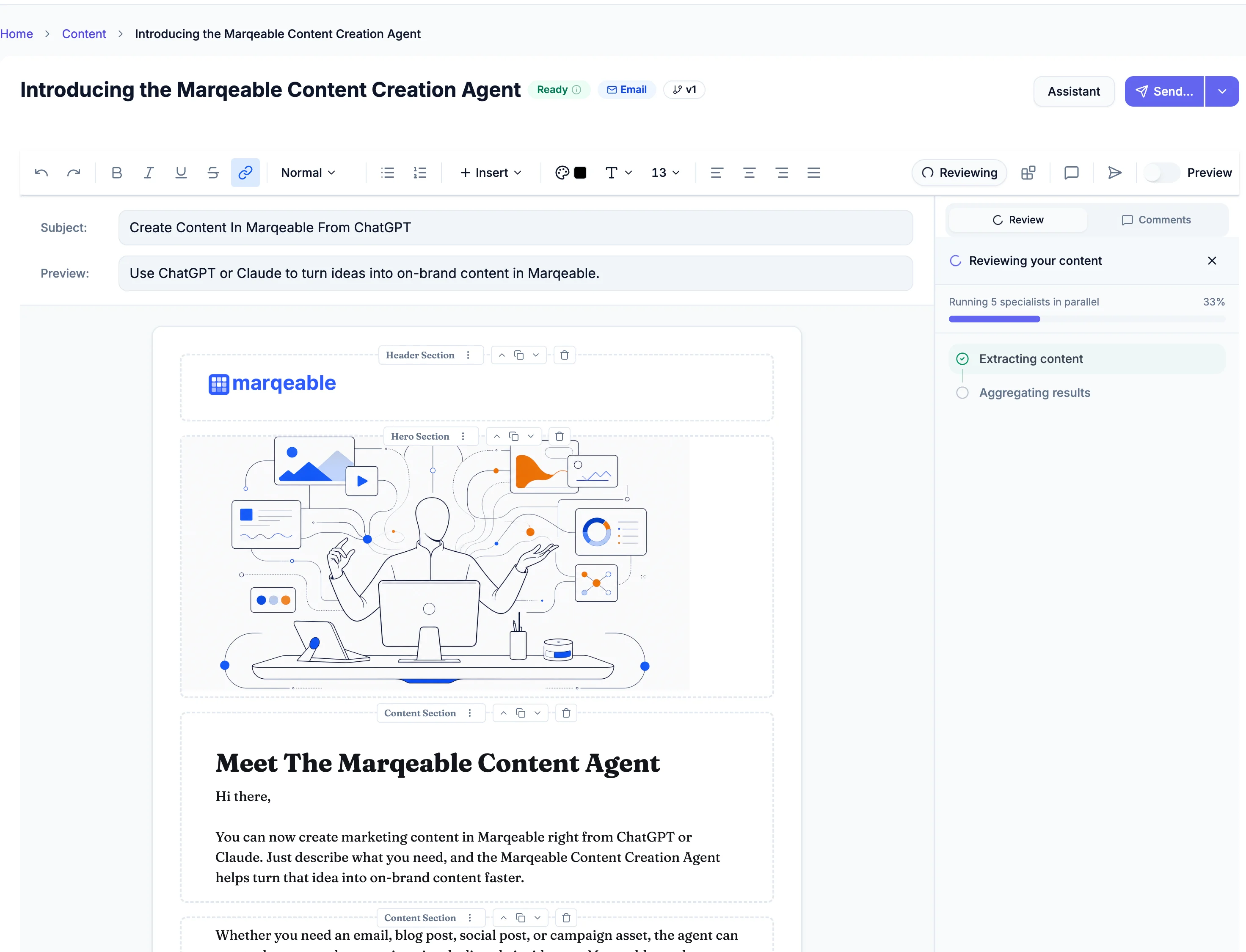
CONTENT REVIEW1 / 3
The agent reviews the content.

The agent reviews the content.

How content review works

The agent reviews language, brand voice, compliance, and strategy, then places suggestions beside the relevant copy. Compare the original and suggested wording, accept or reject a change, or edit it yourself. Teammates can highlight a passage, leave a comment, reply, and resolve the thread.

Explore content creation and review
How calendar planning works

Add business events, launches, offers, and important dates to the marketing calendar. Ask Marqeable about the month from a connected assistant. In this example, the response finds an Annual Conference on November 10, identifies that no campaign is linked, and suggests preparing by October 27. The response recommends a next step; it does not create the campaign in this demonstration.

Explore campaign planning
What the email tour shows

Describe an email in a connected assistant, open the draft in Marqeable, edit the content, check desktop and mobile previews, and select an audience. The demonstration opens the send controls. Its final analytics screen illustrates results from a different email.

ROOM FOR THE REST OF YOUR MARKETING

Keep the
work moving.

Content is one part of the picture. Bring your plans, conversations, and follow-through into the same workspace.

CONNECTED CAMPAIGNS

Keep the tools.
Connect the campaign.

Connect customer data, publishing accounts, and delivery providers. Marqeable uses those connections to run the campaign steps and follow-ups you set.

  1. 01

    Use customer data

    Start with an audience or a customer event.

  2. 02

    Run the campaign

    Send and publish through connected channels.

  3. 03

    Follow up automatically

    Use timing and customer activity to trigger the next step.

CRM & customer data

Build audiences from connected customer records.

  • HubSpotContacts & lifecycle data
  • SalesforceContacts & leads
  • ServiceTitanCustomers & job data

Email & SMS

Use connected providers for campaign delivery.

  • SendGridEmail delivery
  • TwilioSMS & MMS delivery
  • MailchimpCampaign draft sync

Social media

Publish campaign content to connected accounts.

  • LinkedInCompany page posts
  • XPosts & media

Blog & CMS

Connect the platforms where your content lives.

  • WordPressBlog publishing
  • WebflowCMS content
  • ContentfulContent management

Team updates

Keep the team informed as work moves forward.

  • SlackNotifications & workflow updates

One place to manage
the campaign.

Set the audience, review the content, and choose the schedule or trigger. Let the configured workflow handle what comes next.

Set up a connected workspace

Available actions depend on the provider and connected account. Mailchimp sync creates campaign drafts.

Find your fit

Create, publish, and follow up.
From one workspace.

Bring campaign work and customer conversations together. See how Marqeable fits alongside the tools your team already knows, or the agency you already pay.

Compare with

Comparing Marqeable with HubSpot.

Marqeable and HubSpot: workflows and product fit. Plan qualifications and sources follow the comparison.
MarqeablePrivate beta
HubSpotMarketing Hub + connected hubs
Start a campaign

Helps write the brief, then drafts the campaign

Creates the emails, social posts, landing page and images from that brief.

One asset at a time

The content agent drafts one piece at a time, on HubSpot Credits.

Images and creative

Creates on-brand images and creative

Applies your logo, colors and style. Ask for changes in plain English.

AI images and Canva, per asset

Breeze generates images in each editor; Canva is built in.

Landing pages

Builds and hosts the landing page

Includes a lead form. Submissions become leads in Marqeable.

Drag-and-drop builder

Landing pages in Marketing Hub; site pages need Content Hub.

Blog and SEO

Writes SEO blog posts and publishes them

Keyword-aware drafts in your voice, scheduled and published to WordPress, Webflow and more.

Blog tool with SEO suggestions

Included; the content agent drafts posts on HubSpot Credits.

Send and publish

Sends and publishes from one place

Email, LinkedIn, X, SMS, landing pages and blog, on the schedule you set.

Email, social, pages, blog

SMS is a paid add-on on Professional and up.

When a lead replies

Answers, qualifies and books the meeting

Website chat and SMS in seconds. Email replies are drafted for your approval.

A chatbot, or the customer agent on credits

Chat and messaging answered per conversation on HubSpot Credits.

Lifecycle automation

Runs follow-ups based on what the lead does

Replies, page visits and CRM stage changes trigger the next step.

Workflows, Professional and up

Starter gets simple automation; branching workflows need Professional.

Your CRM

Connects to HubSpot or Salesforce

Lifecycle stages come in. Replies, meetings and activity go back.

It is the CRM

Everything lives on the HubSpot contact record.

A good fit forLean marketing teams that test fast. Brief it, ship it, answer the replies, read the ledger: one automated workflow, with you approving what goes out.
Teams standardising marketing, sales and service on HubSpot and budgeting for the hubs it takes.
Plan details & sources

How to read this comparison

HubSpot spans several products and editions. Marketing automation, content, service, and attribution capabilities depend on the hubs and plans you choose.

Sources reviewed September 5, 2026. Summaries describe product scope; individual plans differ.

Marqeable is in private beta

Keep HubSpot or Salesforce as your CRM. Marqeable brings campaign creation, publishing, and lead conversations into a connected workflow. Email replies are drafted for your approval.

Explore the private beta

Your CRM stays. Campaign work comes together.

Explore the private beta
YOUR FIRST STEP

Set up a workspace.
Create a campaign.

01

Get access.

Request early access to Marqeable. We’ll help you get started with your workspace.

02

Bring your idea.

Describe what you want to create, who it’s for, and what you want to say.

03

Make it your own.

Review your draft in Marqeable, check the preview, and prepare it for your audience.

Using Marqeable from ChatGPT, Claude, Claude Code, or Codex requires a connected workspace. We’ll guide you through setup during onboarding.

LET’S PUT YOUR NEXT IDEA TO WORK

What will you
create first?

Hey Marqeable, I have an idea…
Get early access

Your next campaign starts with a conversation.